![ARP logo.png]](https://support.arproactive.com/hs-fs/hubfs/ARP%20logo.png?height=40&name=ARP%20logo.png)
Introduction
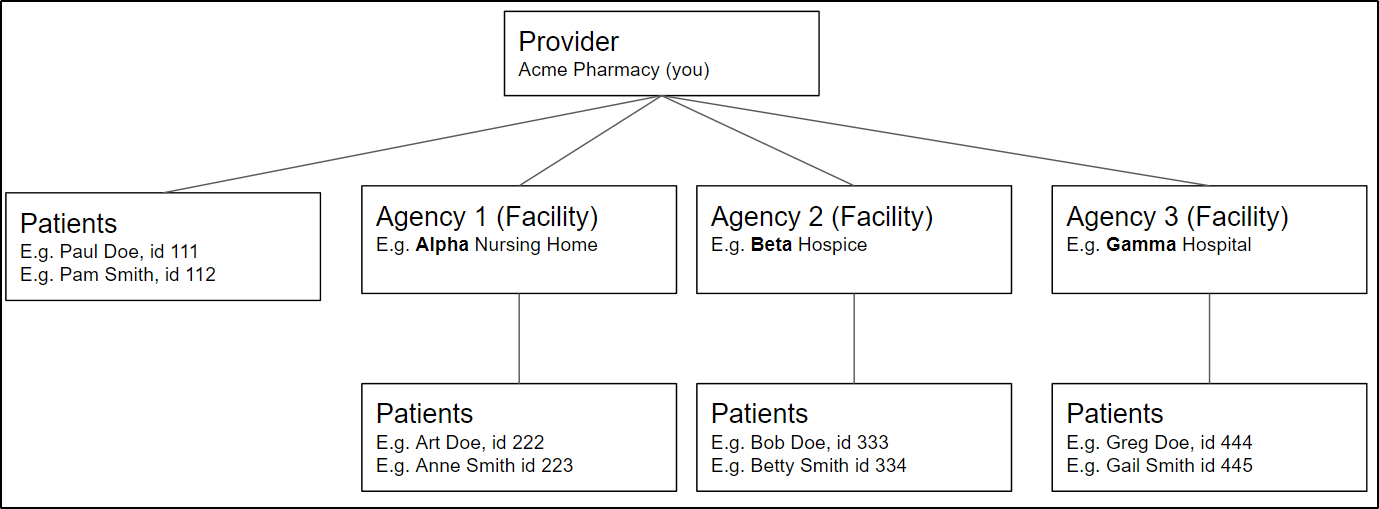
- Some providers have multiple patients that reside (live) in one physical Agency/Facility building.
- Here is how the Agency and the Patients are related:
- AR Proactive can send the patient invoices to the facility in one envelope or email.
- The envelope (or email) will consist of:
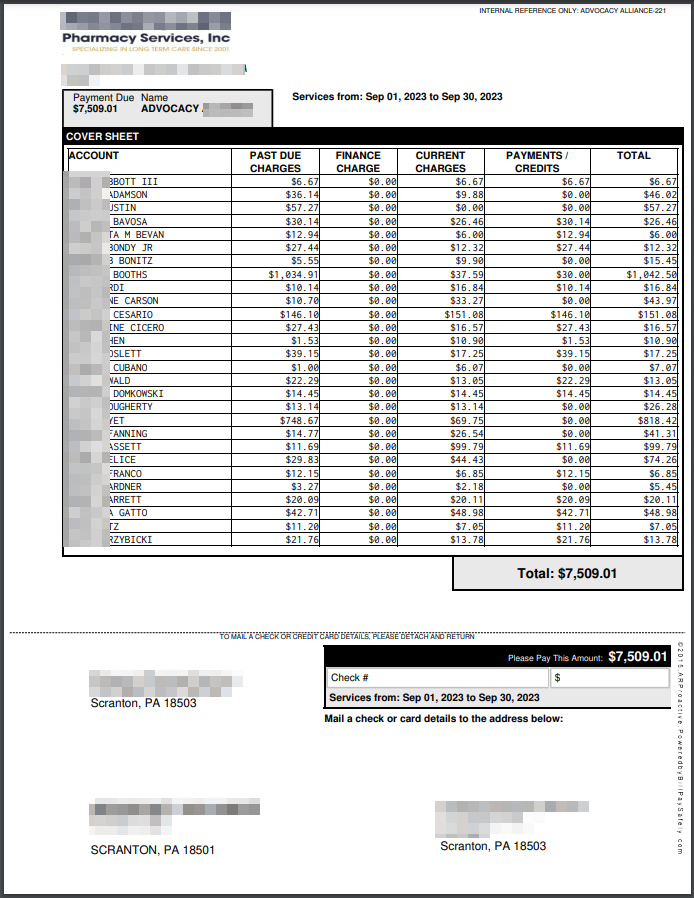
- a cover sheet addressed to the agency/facility, with an option to show each patient's balance owed, and the total owed by the Facility
- all the individual invoices for each patient, showing the patient's current charges, and the patient's balance owed.
- Here is a example of the cover sheet:
- To do Agency billing, you are billed at the same regular rate as for invoices to individual patients.
How to set up agency billing
- To set up agency billing, you need to tell us:
- each Agency's mailing address (or email) and delivery preference (paper mail or email)
- which patients are associated with which Agency
- Group codes: If you use group codes (facility codes) in your practice software to associate each patient with a facility (this is more common), then
- download this GroupCode-to-Facility mapping Excel
- enter the agency details into the Excel
- email the Excel back to support@arproactive.com
- We will need ~4 weeks to program the mapping on our side
- On your next mailing job, you will upload the statement file, and we mail out Agency bills with the coversheet (as well as the regular individual patient bills)
- If you need to add more facilities (or need to change their address/email), update the Excel and email it support@arproactive.com ~4 weeks before your next job.
- Patient IDs: If you use patient ID's in your practice software to associate each patient with a facility (this is less common), then
- download this Patient ID-to-Facility mapping Excel
- enter the patient ID and associated details into the Excel
- email the Excel back to support@arproactive.com
- We will need ~4 weeks to program the mapping on our side
- On your next mailing job, you will upload the statement file together with your Patient ID-to-Facility mapping Excel, and we mail out Agency bills with the coversheet (as well as the regular individual patient bills)
- If you're unsure which method above you use, then
- Ask yourself "How do you know which facility a patient belongs to?
- Is it based on the patient's Group Code in your practice software? Or
- is it based on their patient ID in your practice software, and you have some kind of Excel to link each Patient ID to facility?"
- If you're still not sure, you probably use Group Codes. You can reach out to our Support team to help you clarify.
- Ask yourself "How do you know which facility a patient belongs to?
Note: accessing Agency bills online:
- You are able to access the Agency invoices online in Uploads > Printmail files.
- Your agency/facility cannot access the Agency invoices online (at BillpaySafely.com).
- Of course, the agency is sent their invoice by paper and/or email (which contains a secure link) depending on their delivery preference.